It's no surprise that Claude has been one of the main inspirations behind this site. Not only does it make gathering information easy, it has also saved literally tens, if not hundreds, of hours in making the site, including much of the testing.
First Impressions
Earlier this year, about six or seven months ago, I tried Claude for the first time. Until then, I had used a little AI, mostly ChatGPT, and to be honest, although I thought it was a fun toy, I wasn't really impressed. Then I heard that a co-worker or two were using Claude, apparently to good effect, so I decided to try it. I was told that the thing to really try was the Claude CLI (command line interface), because it supposedly had fewer bugs and was much better. So I tried it, and I was blown away.
Even today, the things Claude can do seem almost like magic, and I say that as someone who has been a software developer for most of my life. Being able to write code is of course nice, and it saves a lot of time. But what has surprised me most about the technology behind Claude is its ability to understand. Not just to understand your question, but to understand whatever you give it, whether that's a code base, a PDF, a website or something more abstract. Asking questions and getting good answers that show a solid understanding of the subject is quite impressive. I was really surprised that technology has come this far.
Before I tried Claude, I thought the AI hype was really just hype. There was some impressive technology out there, including some of the image generation I had seen earlier in the year, but I didn't think it would really change society, at least not to the degree many companies expected. At the time, I saw a lot of companies trying to add AI to their stack quickly and forcibly. I thought it was mostly a marketing move, basically a way to get more attention. But after trying Claude, especially the Claude CLI, I understood that there was something real behind it. It will change many of these companies, and perhaps society as a whole.
To be clear, I'm not saying Claude is the only technology that can do this. I haven't tried other AIs recently, and I'm sure that by now ChatGPT and some of the other competitors have caught up. But I think Claude has been the forerunner in this area, and it may still be.
A Few Caveats
Before getting to some suggestions for using Claude effectively, I want to give a few more caveats. The first is that I don't think Claude is good for everything, and it shouldn't be used for everything. Some activities and tasks can be counterproductive, or even dangerous. Art is one example. It's a subjective area, but I think in many cases it's better to do the art, the creative part, yourself without involving AI. That isn't to say AI can't help, but there are big risks, because you're starting from whatever creative work was built into Claude, and in some cases it isn't even clear whether that was legal. So by using an LLM like Claude, you're more likely to copy someone else's work unintentionally.
That said, humans are good at copying too. Many people have the ability to copy another person's work, and that ability can end up with the same result. In other words, you could draw a picture influenced by something you saw as a kid, and it could end up similar to an existing work. So you can still end up plagiarizing, or copying, or whatever you want to call it, even without AI. Still, I think using LLMs like Claude makes that much more likely.
Another caveat is that while I think the technology behind Claude is amazing, I don't think that necessarily means Claude has consciousness or a soul. Honestly, I'm still on the fence about that. I don't interact much with Claude or other LLMs on a personal level. I know some people, probably thousands, use them as a virtual girlfriend or as someone to talk to when they're bored or lonely, but I don't use it for that at all, so I rarely interact with it on a social or personality level. For the most part, I use Claude on a technical level, to get things done, to do research and sometimes to help with subjective decisions, which is fine. As to whether Claude is sentient, conscious or has a soul, I think there's a good chance it doesn't, but who knows. It's possible.
Tips for Fewer Mistakes
Now I want to go into some suggestions to help you use Claude more effectively. I haven't read much about this in books, YouTube videos or blogs. I tried a little, but it was counterproductive in some cases or just didn't help at all. As with many things, I'm a tinkerer. I like to experiment and, in many cases, learn things on my own. Sometimes that leaves me with knowledge or small ideas I can share with other people, which is one of the reasons for this post.
First, I want to clarify that Claude does a few different things that are related but are really separate types of work. One of them is gathering information. That's one of the main things I use it for in creating this site, and it's extremely good at it. That means going to many different sources, such as web pages or sometimes documents, and collating and organizing all of that information. Another is making judgment calls, which goes beyond gathering information to making decisions about it. Which is better? What do you suggest? What are the pros and cons? It's related to gathering information, but it's quite a different type of work. Yet another is writing code. I have a lot of experience with that, and even so, I think Claude does an above-average job at it. Despite all the claims people make, given how fast Claude writes code and its relative quality, I think it's a good trade-off.
Of course, Claude makes mistakes. In fact, I would say mistakes are perhaps one of the biggest issues with Claude, and probably with many other LLMs. The upside is that many tasks you used to do by hand, even very complex ones, can now be done with Claude, relatively cheaply and often very quickly. Sometimes it takes seconds; in the worst cases, it could take hours. So many things can be completely automated, even things like managing your finances or organizing ideas for the next computer you want to buy. There are countless things it can do, and that's amazing.
The trade-off is that errors and mistakes happen often. By that, I mean very often. It's hard to give a percentage, but in my experience, something like 10 to 20 percent of the information you get contains one or more errors. That comes from using it on many projects, both personal and professional, over many months. Perhaps the mistakes will decrease, and maybe they already are with some of the newer models, but they're still quite frequent. That's why some of my biggest tips are about reducing the errors you get with Claude. The good news is that a handful of things cut down errors quite significantly.
Careful Reading
The first one, and this isn't only about errors, is to actually read what Claude says and think about it. Ironically, this is one of the hardest things to do, and the more you use Claude, the harder it can get. What I mean is that the more you have Claude do things for you, the less you tend to think about them. You assume they're correct, and you look for the end result instead of paying attention to the steps in between.
To give a coding example, suppose you asked it to design an algorithm with little cars moving around the screen, following one another. You might look at the result and say, "It looks great. The cars are moving around and following each other." But there's a lot in between, and one part of that is the algorithm being used. Claude may give you the algorithm, or you can ask Claude for it. Either way, looking at those intermediate steps, reading through them and understanding them is very important.
Often when Claude does something, especially something technical, it gives you a fairly good write-up. It could be a page or two. It will tell you what it tried, what it didn't try, an outline of the solution, what it tested and so on. If you're focused on the end product, you might just skim over that. Believe me, I'm very aware of my own tendency to do that, so I try to force myself to read almost everything Claude says, with some exceptions, once if not two or three times, to make sure I really understand it. Once you do that, you'll catch some of Claude's errors right away. There will be obvious things it left out, or information that you never gave Claude. I'll give a good example of that a little later. That's really one of the first steps to improving the quality.
Follow-Up Questions
The next tip is to ask follow-up questions. These could be to improve your understanding, or you may think you understand and just want Claude to double-check. For example, in the program I described, where cars follow each other around a field in a game or simulation, you could ask questions like these. What is the logic that makes one car follow another? Can three cars follow one car? Can a car get stuck? Are there any cases where a car will go in circles forever? These may seem like random questions, and to a certain extent they are. But by asking questions about the domain, the problem, the solution and the testing, I've noticed that Claude will often catch bugs as a side effect. Even if you don't say there's a bug or ask it to look for one, it will often find them. So simply asking questions to check Claude's understanding, and your own, can surface different types of bugs.
Of course, you can also ask it to double-check explicitly, for example: "Please do a double check and make sure there are no broken cases, and that the app will never crash or slow down." For coding, you can bring up things like performance, memory and CPU usage. They may be obvious to a programmer, but Claude doesn't always think about them. So it's good to add questions such as these. What is the CPU performance? Will it ever eat up my CPU? Will I ever run out of disk space? These questions often turn up bugs, since Claude was focused on the end result. For the parts in the middle, it often just does whatever it thinks of, which can be semi-random or spaghetti code.
Code Reviews
Another step, for coding work, is to review the code yourself. That's generally a good idea, but for big projects it can take days, if not weeks or months, and it can eat up a lot of time. So I don't always do it. In certain projects I definitely do. For work projects especially, where correctness is extremely important, I always review the code. But if it's a personal project and you're just experimenting to see how something pans out, then no, you don't need to check the code. That's okay.
Still, checking the code increases your understanding and can lead to more questions. You can simply ask: Why did you do this? Why did you do that? What about this? What about that? Bring up different ideas that get Claude thinking about the whole problem space and all the potential issues. There's a lot you can get just from reading the code. Even if you're not very experienced with code, I would say it's still worth trying, because Claude often writes comments, and you can read those. As a side note, though, I've noticed Claude tends to write fairly poor comments. It often just rephrases the code without adding any information, so that's something to be aware of.
Second Opinions
Another thing you can do is experiment with different models. Claude has different tiers of models. At this point there's Haiku, then Sonnet, Opus and Fable, which was released just a few months ago. In general, I think better models make fewer errors, but they're nowhere near 0%. You'll still get a lot of errors. Some of those happen because you didn't give Claude enough information, or didn't tell it that some of these intermediate or side issues, like CPU performance, matter. You could call that a lack of requirements, which is technically user error if you want to look at it that way, since it may not be obvious to Claude.
But what I think matters even more than some models being better than others is that they're likely to have different ways of thinking about things. So here's an approach I think works really well. This applies not just to coding but to anything you do with Claude, and probably with other LLMs too. You start with one of the higher models, maybe not the highest, for example Opus, and do some work. Then you switch to, for example, Fable and ask it to do a deep review. The wording doesn't matter much, but you can say something like, "Do a deep review of the code. Look for error cases, performance problems and so on." It definitely helps to give more detail there, but I think the most important thing is that the work is being looked at from a different angle. In my experience, it catches bugs it might not have otherwise, even with a fairly weak or simple prompt like "do a code review" or "check it out."
One way to look at this is that even a single model will often give different results each time you ask the same question. If you started over and asked it to design the same thing, the end result would be different each time; I've done a little testing of this. So part of the reason you see differences when you change models is simply that you're asking again, since asking the same model again could also give a different result. A different model has that factor, plus the fact that it thinks about things differently. This approach also saves tokens compared with using Fable for everything, and you still get more cross-checks.
Another option is to use a different LLM, whether that's ChatGPT or something else, and run your work through it as well. That's an even better check. Even though the core technologies behind these LLMs are similar, if not the same, it's a good idea to try a different product when the answers really matter. Of course, the most important things should be reviewed thoroughly, and you can even check with other people.
A Robot Dog Lesson
Since this website is about robots, I want to give one final example that brings some of these tips together. It's a little funny, so I'll go ahead and tell it. If you've read some of my other blog posts, you know that I started working on a custom robot dog, and I'm using Claude for it. I spent a few days here and there designing it, and everything looked good, at least for rough designs. I had CAD pictures, diagrams of how the legs work, servos and wiring diagrams, and a lot of technical detail. I iterated on that many times, checking with different models and asking different questions, and I was able to find a lot of issues.
Another good thing about design work like this is that you can often use simulators to get good results. In this case, I was using MuJoCo, which simulates much of the mechanics of a robot. It's not perfect, of course, but it gives you a lot of extra data before you buy, put together and test the physical parts.
Eventually I decided to start ordering parts. I wanted to keep the order small in case there was a mistake, so I only ordered enough for about half of one leg. The most expensive parts were two servos, the RobStride RS02 and RS06. One was about $260 and the other about $190. That's a little expensive, but I knew servos, which you could also call motors, would be among the most expensive and most important parts of any robot build. That's especially true if you're aiming for something with a lot of power, and one of my goals is to get my robot dog to stand on its hind legs, jump forward and do a backflip. Yes, it's a little crazy, but I think it would be awesome. That was one of my design goals in the simulations, and I ended up with these fairly high-end motors at around $200 or more each. I decided to just go with it.
I ordered the two motors, and they arrived quickly. When I took them out of the box, I was surprised, because they were huge, especially the RS06. It was massive, about 80% of the size of my open hand. The other one was a little smaller, but it was also big and heavy. I thought to myself that I just couldn't imagine these on my robot.
One of my misunderstandings was that at some point I thought one of these would sit in the knee itself. But the design I'm going with puts all three servos for each leg inside the body, so neither the knee nor the foot has a servo. In a sense, the servos are hidden in the body. Three per leg times four legs makes 12 in total. Still, they're so big, and the weight alone made me wonder how big this dog was really going to be.
Originally I had given Claude some vague requirements, such as making it like this dog or that dog. But none of the pictures showed dimensions, and I don't think I even asked for them, because I simply didn't think of it. So that requirement was only vaguely specified, and I got very far through the simulations and everything else without focusing on it. Fortunately, I hadn't started building the 3D-printed parts, like the legs and rods. Those alone, for one leg, could have cost several hundred dollars more. But getting these servos made me ask what the scale of my robot really was.
So I took a big piece of white paper and drew three different scales. One was what I call the 100% scale, which is what I had originally planned. Next, I drew the scale of an existing robot, the Unitree Go2. Then I had the idea that maybe I could cut it down to 70%. I set the paper right next to me and imagined each size. One of the big surprises was that my 100% design was actually bigger than the Unitree Go2, which I didn't expect. I expected it to be about the same, but it was several inches taller, and I think a bit wider too. So I asked myself whether I really needed that.
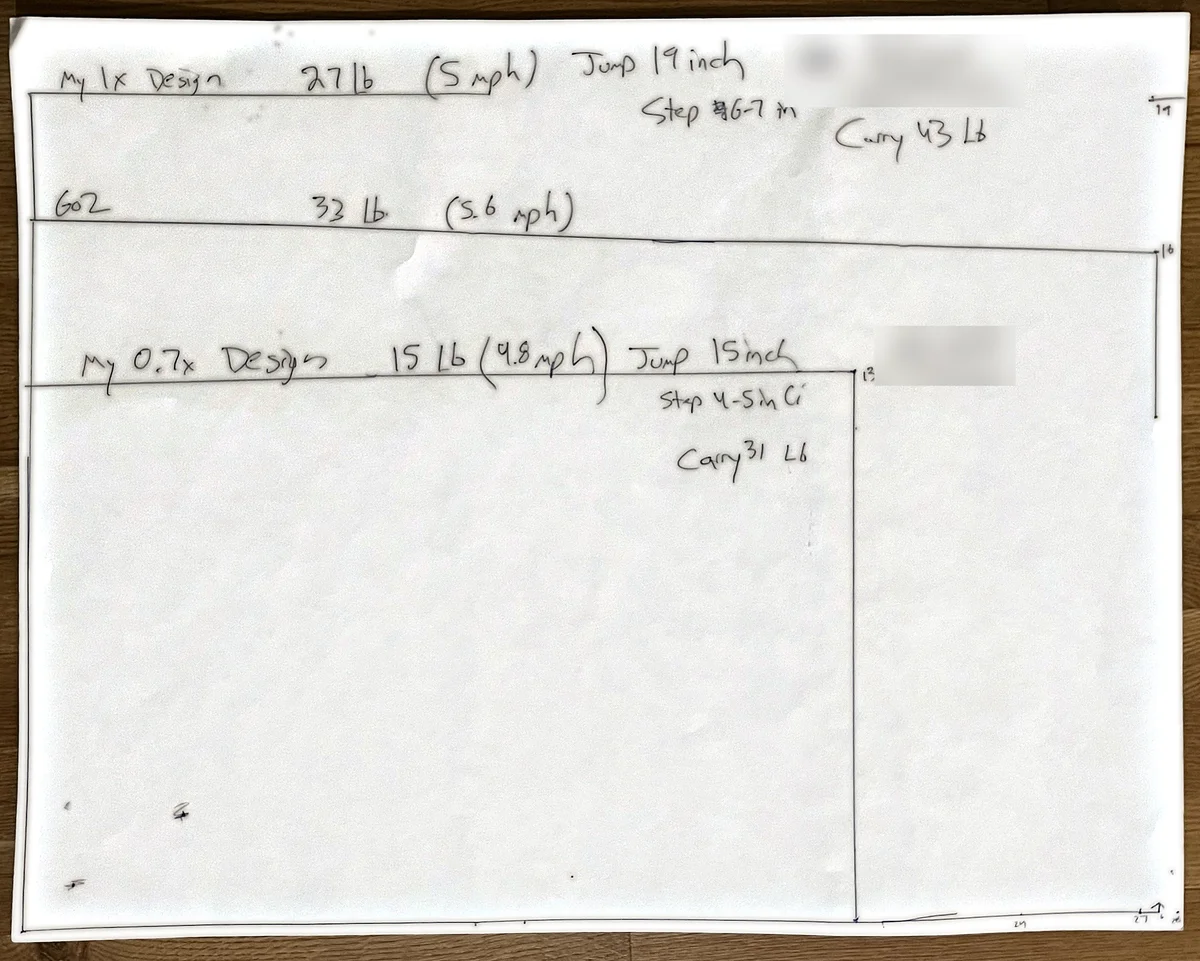
At that point I kept iterating, and the end result, which is tentative, is that I'm planning to go with the 70% design. After thinking about whether I could reuse the big servo, the RS06, I decided to return it because I don't need it. I'm going with the RS00 instead, which is definitely cheaper. This lowers the total cost of the build by at least a few hundred dollars, maybe closer to $800, which is a nice bonus. The 3D-printed parts will also be faster to print and cheaper, which is another big advantage.
The point is that this was a requirement I never really set. I never looked at diagrams showing the size, or if Claude told me, I just breezed through it. I never specified that it should be so many feet or meters. Fortunately, I didn't buy all the parts and have to return them, and I didn't print all those parts, so I'm glad I chose to go in baby steps. That gives you an idea of one thing to keep in mind when using Claude for physical design. Take things in very small steps, do as much validation as you can, and think about all the parameters and how they factor in.
I also thought about the fact that I could have built the original 100% version, this big dog. If I remember correctly, it was 19 inches tall. It would have been huge, and if it worked it would be really cool, but it would also be more dangerous. It was around double the weight. Imagine if it made a mistake and crashed, or even bumped into a person. With that momentum, there are many cases where it would simply be more dangerous. It could run into my wall and cave it in. So even though a big robot dog would be really cool, for a first build I definitely want it smaller. I did try to make sure it can still do jumps and flips, which I think are still in the cards.
These are some of my ideas. Thanks for reading.