Quick picks for robots
| Job | Best fit | Why |
|---|---|---|
| A first robot car | UNO R4 Minima or an UNO R3 clone | Works with every 5 V motor shield, kit and tutorial. The R4 is faster and costs $20 |
| Phone or Wi-Fi control | UNO R4 WiFi or Nano ESP32 | Wi-Fi and Bluetooth built in. The R4 WiFi keeps 5 V pins, the Nano ESP32 is smaller and runs MicroPython |
| Small or light robots | Nano R4 or Nano Every | About $12 to $13, 45 × 18 mm, 5 V pins. The Nano Every can take an interrupt on every pin, which suits wheel encoders |
| Many servos or steppers | Mega 2560 or GIGA R1 WiFi | 54 to 76 pins and several serial ports, the standard for robot arms, hexapods and 3D-printer-style boards |
| Camera, AI and motors on one board | UNO Q ($59 or $79) | A Linux processor for vision and Python next to a microcontroller for exact motor timing |
| ROS 2 | Nano RP2040 Connect with micro-ROS, or a VENTUNO Q | The RP2040 Connect is one of two Arduino boards micro-ROS officially supports. The VENTUNO Q runs full ROS 2 on board |
| A ready-made learning robot | Arduino Alvik ($140) | Arduino's own wheeled robot, with distance, color, line and motion sensors, programmed in MicroPython or blocks |
What an Arduino is
An Arduino is a small circuit board built around a microcontroller, a simple chip that runs a single program without a full operating system like Windows or Linux. That makes it good at the low-level jobs in a robot that need exact timing, such as generating PWM signals for motors, sending pulses to servos and counting encoder ticks. Programs, called sketches, are written in a simplified form of C++ in the free Arduino IDE. Most robots that need a camera or mapping pair an Arduino with a bigger computer such as a Raspberry Pi, which sends it commands over USB or UART.
The boards are open hardware, so anyone may copy the designs, and cheap compatible boards ("clones") are common in robot kits. The Arduino name itself is a trademark. Two newer boards, the UNO Q and VENTUNO Q, add a Linux processor alongside the microcontroller.
Arduino and Qualcomm
Qualcomm agreed to buy Arduino on October 7, 2025, and the deal closed by October 31, 2025. Arduino says it keeps its own brand, tools and open-source licenses and will keep using chips from other makers, and its existing boards carry on unchanged. The first board of the Qualcomm era was the UNO Q, launched the same day as the deal. In November 2025 Arduino updated its terms of service, and critics led by Adafruit objected to a reverse-engineering ban and broad rights over uploaded content. Arduino replied that the ban covers only its cloud services and that "Anything that was open, stays open."
Current boards compared
The logic voltage matters most for robots. Boards with 5 V pins work directly with classic 5 V sensors, shields and modules. Boards with 3.3 V pins can be damaged by a 5 V signal unless the pin is marked 5 V tolerant, so they need a level shifter or a voltage divider for parts like the HC-SR04 ultrasonic sensor. Prices are from Arduino's US store in October 2026.
| Board | Released | Chip | Logic | Wireless | Price (Oct 2026) |
|---|---|---|---|---|---|
| UNO Q 2 GB / 4 GB | Oct 2025 / Jan 2026 | Qualcomm QRB2210 (4 × Cortex-A53, 2.0 GHz) + STM32U585 | 3.3 V | Wi-Fi 5, Bluetooth 5.1 | $59 / $79 |
| VENTUNO Q | 2026 (pre-order) | Qualcomm Dragonwing IQ8 (8 cores, 40 TOPS NPU) + STM32H5 | 3.3 V | Wi-Fi 6, Bluetooth 5.3 | $299 |
| UNO R4 WiFi | Jun 2023 | Renesas RA4M1, Cortex-M4, 48 MHz (+ ESP32-S3 radio) | 5 V | Wi-Fi, Bluetooth | $27.50 |
| UNO R4 Minima | Jun 2023 | Renesas RA4M1, 48 MHz | 5 V | None | $20 |
| UNO R3 | 2010 | ATmega328P, 16 MHz | 5 V | None | $27.60 |
| Nano R4 | Jul 2025 | Renesas RA4M1, 48 MHz | 5 V | None | $12.10 |
| Nano Every | 2019 | ATmega4809, 20 MHz | 5 V | None | $12.90 |
| Nano (classic) | 2008 | ATmega328P, 16 MHz | 5 V | None | $25.70 |
| Nano ESP32 | Jul 2023 | ESP32-S3, 2 cores, 240 MHz | 3.3 V | Wi-Fi, Bluetooth LE | $18.30 |
| Nano RP2040 Connect | 2021 | RP2040, 2 × Cortex-M0+, 133 MHz | 3.3 V | Wi-Fi, Bluetooth LE | $21.30 |
| Nano 33 BLE Sense Rev2 | 2023 | nRF52840, Cortex-M4F, 64 MHz | 3.3 V | Bluetooth LE | $38.70 |
| Nano 33 IoT | 2019 | SAMD21, Cortex-M0+, 48 MHz | 3.3 V | Wi-Fi, Bluetooth LE | $23.90 |
| Mega 2560 Rev3 | 2010 | ATmega2560, 16 MHz | 5 V | None | $49.90 |
| GIGA R1 WiFi | Mar 2023 | STM32H747, Cortex-M7 480 MHz + M4 | 3.3 V | Wi-Fi, Bluetooth | $69.60 |
| Due | 2012 | SAM3X8E, Cortex-M3, 84 MHz | 3.3 V | None | $49.40 |
| Leonardo / Micro | 2012 | ATmega32U4, 16 MHz | 5 V | None | $23.80 / $22.80 |
| Zero | 2015 | SAMD21, 48 MHz | 3.3 V | None | $48.80 |
Release years for the Nano 33 boards, the Nano Every, the Due, the Leonardo and the Zero are approximate. Some older boards cost more than newer, faster ones, since Arduino has not cut their prices. The UNO R3 at $27.60 costs more than the UNO R4 Minima at $20.
UNO Q
The UNO Q puts two computers on an UNO-shaped board. A Qualcomm Dragonwing QRB2210 processor with four Cortex-A53 cores at 2.0 GHz runs Debian Linux, with Wi-Fi, Bluetooth, a camera interface and USB-C video output. Next to it, an STM32U585 microcontroller (Cortex-M33 at 160 MHz) runs ordinary Arduino sketches with exact timing. In a robot, the Linux side can run Python, OpenCV and small AI models while the microcontroller drives motors and servos. The 2 GB version has 16 GB of storage, and the 4 GB version, added in January 2026, has 32 GB.
- Price. It launched at $44 (2 GB), and the 4 GB arrived at $59. Arduino raised both by $15 to $20 on July 6, 2026, to $59 and $79, saying memory costs had more than doubled in six months. Arduino reported more than 270,000 shipped by September 2026.
- Software. Arduino App Lab combines sketches, Python scripts and ready-made "Bricks" such as object detection or a web dashboard, and links to Edge Impulse for training custom models. The Arduino IDE and VS Code also work.
- Pins. The UNO headers run at 3.3 V. Some digital pins accept 5 V as inputs, but A0 to A5 and D3 do not, so older 5 V shields need checking before use.
- Speed. Reviewers at launch put its Linux performance a couple of years behind a Raspberry Pi 5. No official ROS 2 tutorial exists yet, though community builds run ROS 2 in a Docker container.
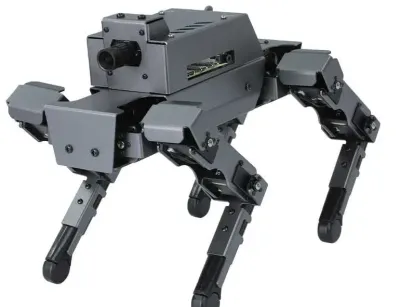
A community project swapped a UNO Q into the DOGZILLA S2 robot dog in place of its Raspberry Pi, and Arduino used the result in its own advertising.
VENTUNO Q
Announced in March 2026 as an "AI, robotics, and actuation platform," the VENTUNO Q is the big sibling of the UNO Q. A Qualcomm Dragonwing IQ8 processor with eight cores and an NPU rated at 40 TOPS sits beside an STM32H5 microcontroller at 250 MHz, with 16 GB of memory, 64 GB of storage plus an M.2 slot, three camera inputs, 2.5 gigabit Ethernet and CAN-FD for industrial motors. Arduino pitches it for ROS 2 robots, pick-and-place arms and visual mapping, and publishes a ROS 2 lidar tutorial for it. At $299 on pre-order with 3 to 4 weeks' delivery, it competes with an NVIDIA Jetson Orin Nano rather than with other Arduino boards.
UNO R4 (Minima and WiFi)
The UNO R4 boards, released in June 2023, keep the UNO shape and 5 V pins but swap the old 8-bit chip for a 32-bit Renesas RA4M1 (Cortex-M4 at 48 MHz) with 32 KB of RAM, 16 times as much as the UNO R3. That room matters once a robot uses several libraries at once. Both have USB-C, a 12-bit DAC, a real-time clock and CAN, and accept 6 to 24 V on VIN.
- UNO R4 Minima ($20), the cheapest official 32-bit UNO and a good default for a new robot car.
- UNO R4 WiFi ($27.50), which adds an ESP32-S3 for Wi-Fi and Bluetooth, a Qwiic connector and a 12 × 8 LED matrix that robots often use as a face. It is the board in the Plug and Make Kit and Starter Kit R4.
Each pin on an R4 can supply only 8 mA, against about 20 mA on an R3, so LEDs and relays that an R3 drove directly need a transistor. A few old libraries that write to the AVR chip's registers do not work on the R4.
UNO R3
The UNO R3 is the board nearly every robot tutorial and kit assumes. Its ATmega328P chip runs at 16 MHz with 32 KB of program space and only 2 KB of RAM, which is enough for driving motors, reading a few sensors and following a line, but not for long text, large arrays or ROS 2. Each pin can drive about 20 mA, and the board runs from 7 to 12 V on its barrel jack. The official board costs $27.60, and compatible clones cost a fraction of that, which is why most robot car kits include one.
- Common uses. Robot cars such as the ELEGOO Smart Robot Car V4.0, GalaxyRVR and Yahboom Roboduino, all built on UNO R3-compatible boards, and the mBot, whose mCore board is Arduino-based. The Bittle robot cat's NyBoard is also Arduino-class.
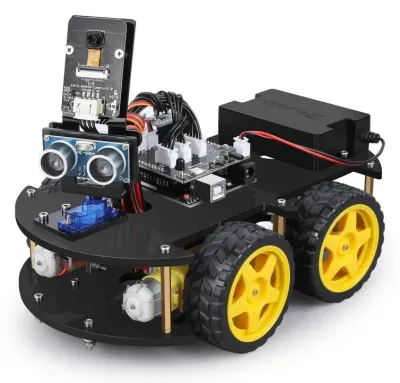 ELEGOO Smart Robot Car Kit V4.0$79.99
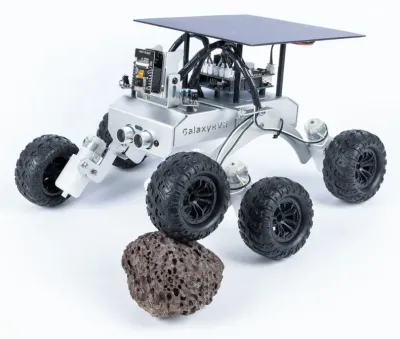 SunFounder GalaxyRVR Mars Rover Kit$129.99
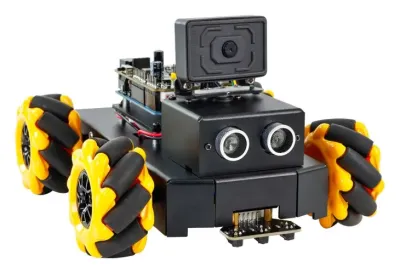 Yahboom Roboduino V2 AI Vision Car$99.99
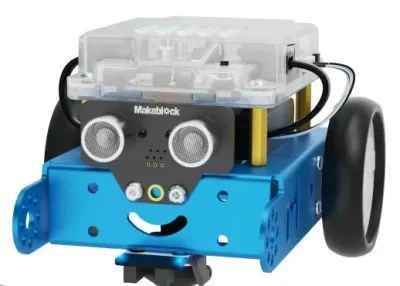 mBot$69.99 – $149.99
Nano family
The Nano boards fit the same jobs as an UNO on a 45 × 18 mm board that plugs into a breadboard or a robot's own circuit board. They come in two groups.
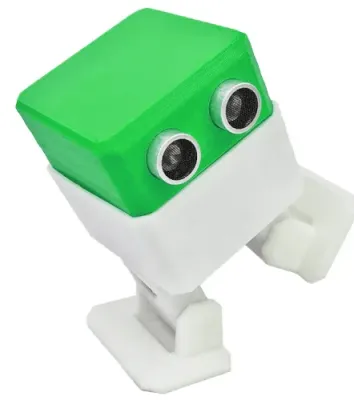
- 5 V Nanos. The Nano R4 ($12.10), released in July 2025, is the cheapest official Arduino and uses the UNO R4's 32-bit chip. The Nano Every ($12.90) can take an interrupt on every pin, handy for reading wheel encoders. The classic Nano ($25.70) is the version most kits and clones copy, and it runs the classic Otto DIY walking robot.
- 3.3 V Nanos with wireless. The Nano ESP32 ($18.30) has a fast ESP32-S3 with Wi-Fi and Bluetooth and runs MicroPython, and it is the brain of the Arduino Alvik robot. The Nano RP2040 Connect ($21.30) adds Wi-Fi, an IMU and a microphone, and is one of two Arduino boards that micro-ROS officially supports for ROS 2. The Nano 33 BLE Sense Rev2 ($38.70) packs an IMU, microphone, gesture, color and environment sensors for small machine-learning projects. The Nano 33 IoT ($23.90) runs the Engineering Kit Rev2. The Nano Matter ($19.90) is meant for smart-home devices.
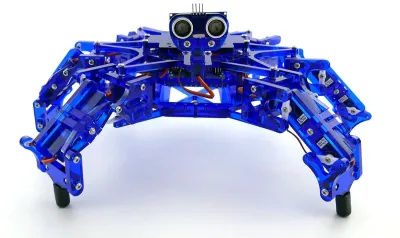
DIY blueprints built on a Nano include OpenBot, a phone-powered robot car whose Nano runs the motors, the Vorpal hexapod, the Otto DIY walker and the Dingo quadruped, which uses a Nano for its sensors beside a Raspberry Pi 4. The DexHand robot hand runs on a Nano RP2040 Connect.
Mega 2560
The Mega 2560 ($49.90) is a large 5 V board with 54 digital pins (15 with PWM), 16 analog inputs, four serial ports and 8 KB of RAM. Its pin count made it the standard controller for 3D printers through the RAMPS shield, and robot arms built from 3D-printer parts still use the same pairing. It runs the BCN3D Moveo and Thor arms, the discontinued uArm Swift Pro and the Niryo One, and it suits hexapods that need many servo outputs. The Servo library can drive up to 48 servos on a Mega, against 12 on an UNO.
DIY blueprints that use a Mega include the Moveo and Thor arms, the life-size InMoov humanoid (with UNO boards for some parts), the AmazingHand robot hand and the original Spot Micro quadruped, whose later builds moved to a Raspberry Pi.
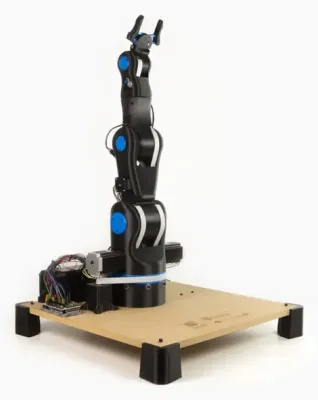 BCN3D MoveoDIY (parts only)
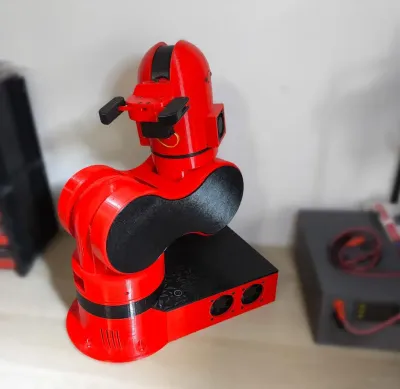 ThorDIY, < $390 (€350) parts
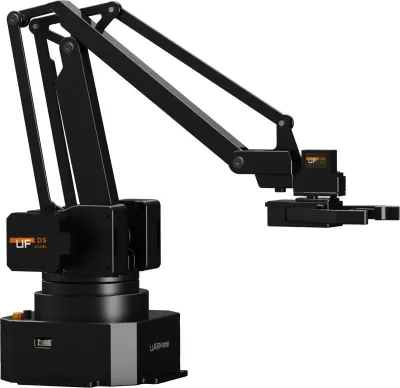 UFACTORY uArm Swift ProWas $749 (2019)
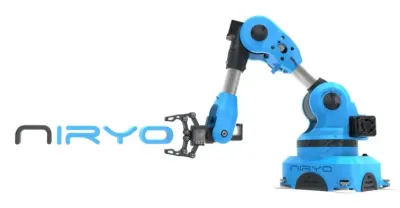 Niryo OneWas ~$1,460 – $2,020…
GIGA R1 WiFi and Due
The GIGA R1 WiFi ($69.60), released in March 2023, keeps the Mega's shape but uses an STM32H747 chip with a 480 MHz Cortex-M7 core and a 240 MHz Cortex-M4 core, 1 MB of RAM plus 8 MB of extra memory, Wi-Fi, Bluetooth and a camera connector, across 76 pins. It suits robots that need both many pins and real processing power, such as running two control loops at once. Its pins work at 3.3 V and supply only 8 mA each, so 5 V Mega shields need checking first. The older Due ($49.40) was the first 32-bit Arduino and has the same limits, and the GIGA has mostly replaced it.
Leonardo, Micro, Zero and specialist boards
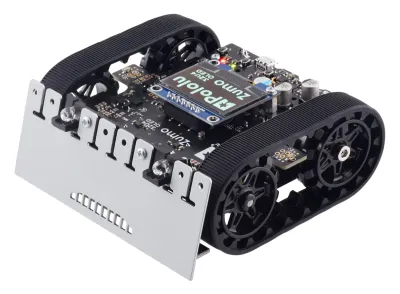
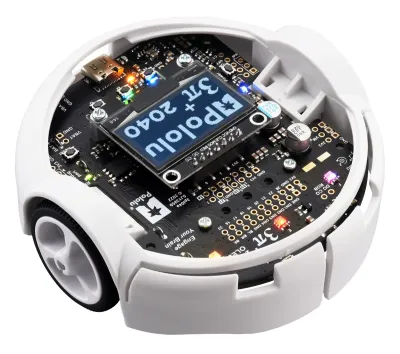
- Leonardo and Micro ($23.80 and $22.80). Their ATmega32U4 chip has USB built in, so the board can act as a keyboard, mouse or game controller, which is useful for robot remote controls. The same chip runs Pololu's Zumo 32U4 and 3pi+ 32U4 robots and the Hexy hexapod's controller.
- Zero ($48.80). A 32-bit UNO-shaped board with a built-in debugger, at 3.3 V.
- Nicla. Tiny 23 mm square modules. The Nicla Vision ($80.20) is a small smart camera with a distance sensor, used for line and object tracking, and the Nicla Voice ($49.40) recognizes spoken wake words.
- Portenta. Industrial boards from $41.99 to $200. The Portenta H7 is officially supported by micro-ROS, and the Portenta X8 runs Linux with an official ROS 2 tutorial.
- MKR. A 3.3 V line of small Internet-of-things boards, several now sold out, with little use in robots today.
Older and retired boards
These turn up in used kits and older tutorials. Most sketches written for them still compile for a current UNO or Leonardo, as long as they fit in memory.
| Board | Years | Notes |
|---|---|---|
| Diecimila, Duemilanove | 2007–2010 | Early UNO-shaped boards with ATmega168 or 328P chips and an FTDI USB chip. Same pinout as the UNO. |
| Pro Mini | 2008 onward | A tiny ATmega328P board with no USB port, in 3.3 V and 5 V versions. Retired by Arduino but still common as a clone in small robots. |
| Esplora | 2012 | A Leonardo built into a game-controller shape with a joystick and sensors. |
| Arduino Robot | 2013 | Arduino's first wheeled robot, with two ATmega32U4 boards and a small screen. |
| Yún, Tian | 2013–2016 | Boards that paired a microcontroller with a small Linux Wi-Fi chip, an early version of the UNO Q idea. |
| Arduino 101 | 2015 | Intel Curie chip with an IMU and Bluetooth LE, at 3.3 V. |
| Mega ADK, M0, Primo, UNO WiFi (first version) | 2011–2017 | Retired. The UNO WiFi Rev2 ($55.40) is still listed but costs twice as much as an UNO R4 WiFi. |
Arduino's own robots and kits
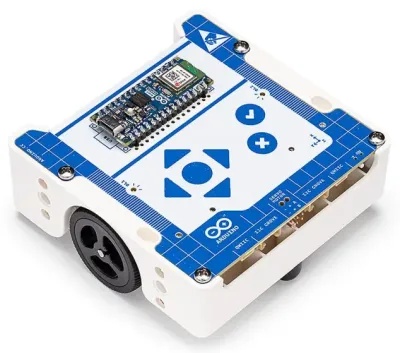
- Arduino Alvik ($140). A three-wheeled classroom robot unveiled in 2024, run by a Nano ESP32 with an STM32 helper chip. It has an 8 × 8 zone distance sensor, a color sensor, a three-sensor line follower, an IMU, touch buttons and an 18650 battery charged over USB-C, plus LEGO Technic and Qwiic mounting points. It is programmed in MicroPython, Arduino sketches or blocks.
- Engineering Kit Rev2 ($289). A Nano 33 IoT with the Nano Motor Carrier, encoder motors, a servo and a webcam for three projects: a self-balancing motorcycle, a camera-guided forklift rover and a whiteboard-drawing robot. It includes a one-year MATLAB and Simulink license.
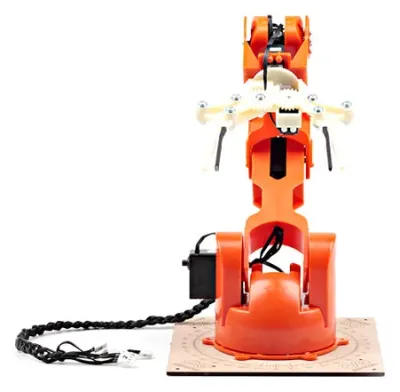
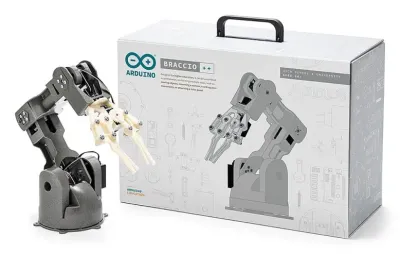
- Tinkerkit Braccio ($275). A six-servo desktop arm with a 150 g payload, sold without an Arduino board. Its successor, the Braccio++, which used the Nano RP2040 Connect and launched at $599, is no longer in Arduino's stores.
- Plug and Make Kit ($87.99) and Starter Kit R4 ($95). Both build on the UNO R4 WiFi. The Starter Kit includes a servo and a DC motor among its parts.
- Modulino nodes. Small plug-in modules joined by Qwiic cables, so no soldering is needed. Modulino Motors ($12.40) drives two DC motors or one stepper at 5 to 24 V and up to 3.8 A per channel. Modulino Distance ($11.60), Movement ($11.80) and Joystick ($15.23) cover a robot's basic senses and controls.
Shields and add-ons for robots
A shield plugs on top of an UNO or Mega. Most robot parts are sold as small modules wired to the pins instead. Arduino's prices are from its US store. Others are typical prices, and generic copies often cost much less.
| Part | Price | What it does |
|---|---|---|
| Arduino Motor Shield Rev3 | $28.40 | Drives two DC motors or one stepper with an L298 chip, and measures motor current. |
| L298N module | About $3–8 | The classic dual motor driver in robot car kits. It wastes about 2 V as heat, so small motors run slower than on newer drivers. |
| TB6612FNG driver | $6.95 (Adafruit) | Dual driver for 4.5 to 13.5 V motors at 1.2 A each, more efficient than the L298N and fine with 3.3 V boards. |
| DRV8833 driver | $5.95 (Adafruit) | Dual driver for low-voltage motors from 2.7 to 10.8 V, such as small gear motors on a 2-cell battery. |
| PCA9685 servo driver | $14.95 (Adafruit) | Generates 16 servo signals in hardware over I2C, which stops jitter and frees the board's pins. Common on hexapods and arms. |
| A4988 stepper driver | $8.95 (Pololu) | Drives one stepper motor at 8 to 35 V. Four of them sit on a CNC Shield for drawing robots and arms. |
| HC-SR04 ultrasonic sensor | $3.95 (Adafruit) | Measures distance from about 2 cm to 4 m. It needs 5 V, and its echo signal needs dividing down for 3.3 V boards. |
| HC-05 and HM-10 Bluetooth modules | About $5–10 | Add phone control over a serial link. The HC-05 works with Android only, and the HM-10 (Bluetooth LE) also works with iPhones. |
| Modulino Motors | $12.40 | Arduino's plug-in motor driver, two DC motors or one stepper at up to 24 V, connected by a Qwiic cable. |
Clones, ESP32 and other compatible boards
Because the designs are open, many companies sell boards that work like an Arduino. A typical UNO clone uses a CH340 USB chip instead of Arduino's own, which older computers may need a driver for, and costs about $3 to $15. ELEGOO, SunFounder, Yahboom and Keyestudio robot kits all ship with their own UNO-compatible boards.
- ESP32 boards, often $5 to $10, are much faster than an UNO and have Wi-Fi and Bluetooth built in. They are programmed from the same Arduino IDE, but their pins work at 3.3 V. Many recent robots use one as their main controller, including the MechDog, StackForce, mBot2 and Freenove ESP32 car, or as a motor helper next to a Raspberry Pi, as in the UGV Rover. ESP32 DIY blueprints include the Sesame, Kame32 and SpotMicroESP32 Leika walkers, the Stack-chan desk companion and Espressif's own ESP-Drone.
- Raspberry Pi Pico boards, built on the RP2040 and RP2350 chips, can also be programmed in the Arduino IDE. See the Raspberry Pi Guide.
- Seeed XIAO and Adafruit Feather boards are small 3.3 V compatibles. The XIAO ESP32S3 costs $7.49, and Feathers add battery charging and stackable add-on boards.
- Teensy boards are fast Arduino-compatible boards that micro-ROS supports officially. A Teensy 4.1 runs the AR4 robot arm, and a Teensy 3.5 runs the Faze4 arm blueprint.
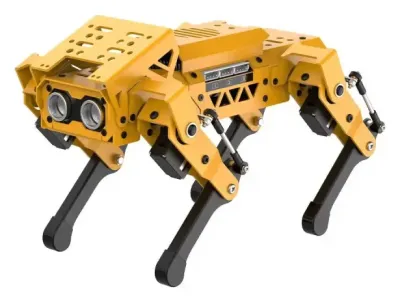 MechDog$299.99 – $569.99
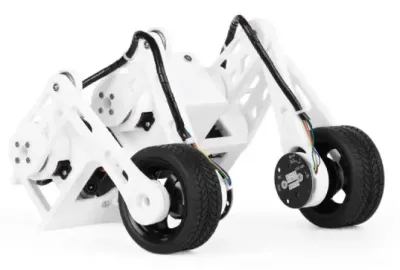 StackForce Mini Wheel-Legged$299
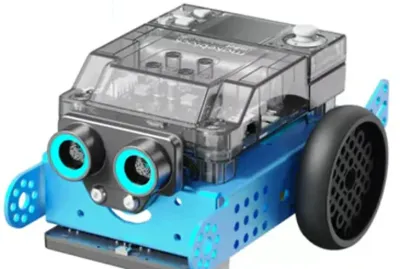 mBot2 / mBot Neo$149.99 – $279.99
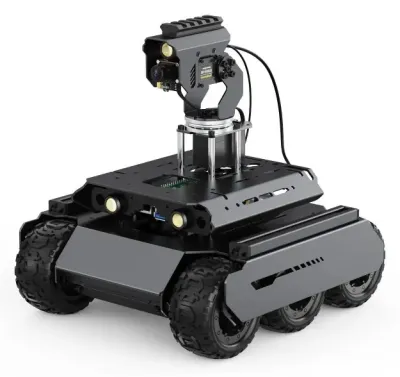 UGV Rover$245 – $727
Software
- Arduino IDE 2, free for Windows, macOS and Linux, currently version 2.3.10. It installs support for other boards, including ESP32 and Pico, through its Boards Manager.
- Arduino Cloud, a browser editor with phone dashboards for controlling a project over the internet. The free plan covers two devices, and the Maker plan costs $6 a month.
- Arduino App Lab, for the UNO Q and VENTUNO Q only, which runs sketches, Python and AI models together.
- MicroPython, supported on the Nano ESP32, Nano RP2040 Connect, Nano 33 BLE, GIGA, Portenta and Nicla Vision. The classic 8-bit boards such as the UNO R3 and Mega have too little memory.
- ROS 2 through micro-ROS, which lets a microcontroller act as a node in a ROS 2 robot. Arduino's officially supported boards are the Portenta H7 and Nano RP2040 Connect, with community support for the UNO R4, GIGA, Due, Zero and Opta. The UNO R3 does not have enough memory.
- Zephyr. Arm ended its Mbed OS in July 2026, and Arduino is moving the boards that used it (GIGA, Nano 33 BLE, Nano RP2040 Connect, Portenta, Nicla, Opta) to a new core built on Zephyr. Arduino says existing sketches keep working.
Official pages Arduino US store ↗ · Arduino documentation ↗ · Arduino software ↗ · UNO Q price change (July 2026) ↗
Pins that matter for robots
Two pin types decide what a board can do in a robot. PWM pins set motor speed with analogWrite, and interrupt pins catch every pulse from a wheel encoder without missing any.
| Board | PWM pins | Interrupt pins |
|---|---|---|
| UNO R3, UNO R4, classic Nano | 3, 5, 6, 9, 10, 11 | 2, 3 only |
| Nano Every | 3, 5, 6, 9, 10 | Every digital pin |
| Leonardo, Micro | 3, 5, 6, 9, 10, 11, 13 | 0, 1, 2, 3, 7 |
| Mega 2560 | 2–13, 44–46 | 2, 3, 18, 19, 20, 21 |
| GIGA R1 WiFi | 2–13 | Every pin |
| Nano ESP32, Nano 33 BLE | Most pins | Every pin |
| Nano RP2040 Connect | Most pins | 0–13, A0–A5 |
A two-wheeled robot with encoders on both wheels needs at least two interrupt pins, and four for full direction sensing, so an UNO runs out quickly. On boards other than the Mega, the Servo library also switches off PWM on pins 9 and 10, even when no servo is plugged into them, which catches out many robots that use those pins for motor speed.
Tips for using an Arduino in a robot
- Give motors and servos their own power. Motors starting up pull the battery voltage down and can reset the board. A separate supply for motors and servos, with the grounds joined and a large capacitor near the driver, avoids most mystery resets. The board's 5 V pin cannot power more than a servo or two.
- Never drive a motor from a pin. Pins supply 8 to 20 mA, and a small motor needs hundreds. A motor driver goes in between, and its own diodes protect the board.
- Check 5 V against 3.3 V. A 5 V sensor wired to a 3.3 V board such as the Nano 33, Due or UNO Q can damage it. Most hobby servos accept the 3.3 V signal, even when powered at 5 to 6 V.
- Use a battery the regulator can handle. A 2-cell LiPo (7.4 V) or six AA cells (9 V) on VIN is the usual setup. The UNO R3 and Mega's regulator gets hot from 12 V under load, while the UNO R4 accepts up to 24 V.
- Watch the memory on 8-bit boards. The UNO R3's 2 KB of RAM fills up fast with text, arrays and libraries, which causes strange crashes. Moving to an UNO R4 or a Nano R4 is the easy fix.
- Split the work with a bigger computer. For a camera, mapping or AI, an Arduino handles the motors and sensors while a Raspberry Pi, laptop or the UNO Q's own Linux side does the thinking and sends commands over serial.